Echo App
Echo App
Type: Volunteer app / Bootcamp Project
Tools: Figma, FigJam, Google Forms, Zoom
Role: UX/UI Designer
Type: Volunteer app / Bootcamp Project
Tools: Figma, FigJam, Google Forms, Zoom
Role: UX/UI Designer
Role: UX/UI Designer

“Every volunteer work is an echo that leaves its impact on the lives of others”
“Every volunteer work is an echo that leaves its impact on the lives of others”
Project Overview
Project Overview
Echo is a volunteering app designed to help users find and engage with volunteer opportunities based on their skills, location, and interests. Instead of generic listings, Echo matches users with meaningful opportunities that align with their personal capabilities and availability.
Echo is a volunteering app designed to help users find and engage with volunteer opportunities based on their skills, location, and interests. Instead of generic listings, Echo matches users with meaningful opportunities that align with their personal capabilities and availability.
My Role
My Role
I worked with a team and I contributed as a UX/UI Designer throughout the project lifecycle. My work centered on understanding volunteer motivations and problems, structuring the user experience, and delivering a polished user interface.
I worked with a team and I contributed as a UX/UI Designer throughout the project lifecycle. My work centered on understanding volunteer motivations and problems, structuring the user experience, and delivering a polished user interface.
UX Responsibilities
UX Responsibilities
Conducted secondary research and user interviews
Created surveys (74 responses) to uncover insights
Synthesized data into affinity maps and pain points
Developed user personas
Defined problem statements and user needs
Created information architecture and user flows
Conducted secondary research and user interviews
Created surveys (74 responses) to uncover insights
Synthesized data into affinity maps and pain points
Developed user personas
Defined problem statements and user needs
Created information architecture and user flows
UI Responsibilities
UI Responsibilities
Designed wireframes (Low-fi to Hi-fi)
Defining the design system
Designing reusable UI components
Built high-fidelity screens & interactive prototype
Ensured visual clarity and consistency across screens
Designed wireframes (Low-fi to Hi-fi)
Defining the design system
Designing reusable UI components
Built high-fidelity screens & interactive prototype
Ensured visual clarity and consistency across screens

Design Process
Design Process
Research: Conducted interviews with target users to understand volunteering experiences, Distributed a survey and gathered 74 user responses, Built an affinity diagram to group insights.
Define: Identified core problems such as difficulty finding relevant volunteer opportunities. Conducted competitor analysis to discover gaps and advantages. Unique insight: Matching volunteer opportunities based on user skills was a key differentiator.
Ideate: Brainstormed multiple ideas and prioritized features using MoSCoW method. Defined the core solution: An app that filters volunteer opportunities by skill, location, and time preference.
Design: Sketched concepts and iterated through Low-fi, Mid-fi, and Hi-fi wireframes. Created an interactive prototype to test user flows and features.
Test: Conducted usability testing with 7 participants. Collected feedback and iterated on the design accordingly.
Research: Conducted interviews with target users to understand volunteering experiences, Distributed a survey and gathered 74 user responses, Built an affinity diagram to group insights.
Define: Identified core problems such as difficulty finding relevant volunteer opportunities. Conducted competitor analysis to discover gaps and advantages. Unique insight: Matching volunteer opportunities based on user skills was a key differentiator.
Ideate: Brainstormed multiple ideas and prioritized features using MoSCoW method. Defined the core solution: An app that filters volunteer opportunities by skill, location, and time preference.
Design: Sketched concepts and iterated through Low-fi, Mid-fi, and Hi-fi wireframes. Created an interactive prototype to test user flows and features.
Test: Conducted usability testing with 7 participants. Collected feedback and iterated on the design accordingly.

Usability Testing & Metrics
Usability Testing & Metrics
✲ Testing Method: Task-based usability testing.
✲ Participants: 7 users
Key Metrics:
90% of users found opportunities more relevant after filtering by skills
80% reported that browsing opportunities felt easier and more meaningful
Visual clarity and navigation confidence improved as a result of iterations
✲ Testing Method: Task-based usability testing.
✲ Participants: 7 users
Key Metrics:
90% of users found opportunities more relevant after filtering by skills
80% reported that browsing opportunities felt easier and more meaningful
Visual clarity and navigation confidence improved as a result of iterations
Design Solutions

Personalized opportunity matching 🔭
Personalized opportunity matching 🔭
Volunteer opportunities are recommended based on the user’s skills, location, and preferred time, reducing irrelevant listings and making the experience more meaningful.
Volunteer opportunities are recommended based on the user’s skills, location, and preferred time, reducing irrelevant listings and making the experience more meaningful.
Calendar-based task tracking 🗓️
Calendar-based task tracking 🗓️
Calendar-based task tracking 🗓️
Users can add volunteer opportunities to a calendar, mark them as completed, and track their progress in one place.
Users can add volunteer opportunities to a calendar, mark them as completed, and track their progress in one place.

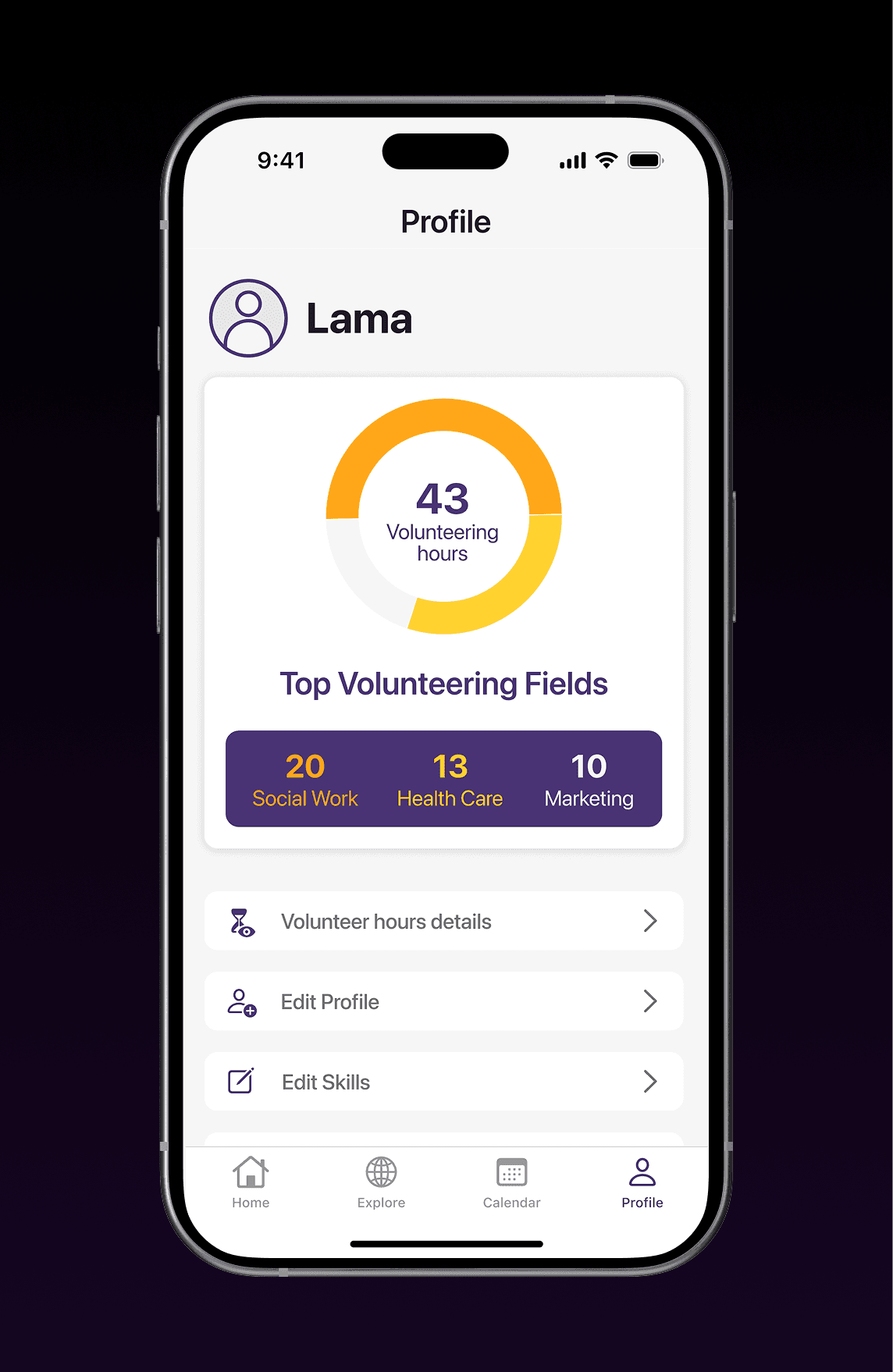
Volunteer profile with impact summary ✨
Volunteer profile with impact summary ✨
Volunteer profile with impact summary ✨
The profile page highlights completed opportunities and total volunteer hours, reinforcing a sense of achievement and long-term motivation.
The profile page highlights completed opportunities and total volunteer hours, reinforcing a sense of achievement and long-term motivation.
Outcome
Outcome
Echo successfully provided a volunteer experience that is:
Relevant: Opportunities tailored to individual skills
Easy to discover: Clear filters by date, location, and field
Actionable: Users can navigate upcoming events and select based on real preferences
Echo successfully provided a volunteer experience that is:
Relevant: Opportunities tailored to individual skills
Easy to discover: Clear filters by date, location, and field
Actionable: Users can navigate upcoming events and select based on real preferences
✴︎ Final Result: Echo demonstrates a user-centered design approach that transforms the volunteer search from generic browsing into a personalized and meaningful experience.
✴︎ Final Result: Echo demonstrates a user-centered design approach that transforms the volunteer search from generic browsing into a personalized and meaningful experience.